Monday, January 13, 2014
#edcampLiberty 2014 Reflections - Why I Love Edcamps
If you have ever attended an edcamp you will read this post and understand. If you have never attended an edcamp the following comments may seem a bit over the top but I urge you to add attending an edcamp to your short list of experiences for 2014.
The first edcamp I attended was amazing (edcampKC 2012) and thought maybe it was just one of those magical days when everything clicks and I lucked out. Then I attended my second edcamp (edcampKC in 2013) and I had the same outstanding experience. This week I attended edcampLiberty - in Liberty, Missouri which was hosted by my school district (Liberty Public Schools) - and again had an amazing, uplifting, and "I love being an educator" experience. Three home runs in three at bats - I'm a believer and it has impacted the way in which I look at all my other professional development and the conferences I attend. To be honest, and I have heard this from many other people, it almost spoils traditional PD experiences after you attend an edcamp.
So here is my reflection after attending edcampLiberty this past weekend...
This past November multiple educators from my district attended edcampKC. Kyle Pace (@kylepace) and Laura Gilchrist (@lauragilchrist4) do an amazing job organizing edcampKC and it has to be one of the best edcamps in the country. My fellow Liberty teachers felt the same way I did about the edcamp experience - empowered and energized. Two of of our district's instructional coaches - Tracey Kracht (@lpstechmentors on Twitter) and Sara Wickham (@sara_wickham on Twitter) - had plans to host an edcamp in Liberty roughly 24 hours after attending edcampKC. Their hard work - and the work of many Liberty teachers, staff and administrators - made edcampLiberty a reality on January 11, 2014 at Liberty North High School.
EdcampLiberty had roughly 200 educators from 19 school districts in attendance. Think about that for a second. Nearly 200 teachers decided to give up an entire Saturday to discuss their passion with fellow teachers. The experience of an edcamp is invigorating. It is something you just want to bottle up and drink up on those days when you think twice about why you teach.
Here are a couple of my personal observations...
I love that edcamps are about conversations instead of an expert lecturing a room full of people. Isn't this what we want our classrooms to be like? Edcamp sessions are active, participants share ideas and talk to each other. This rarely happens at traditional conferences that I typically attend.
I love that edcamps discuss topics that are current and fresh. I recently presented at a national conference in which the proposals to present were due nine months in advance of the actual conference. As the board of sessions filled up the morning of edcampLiberty, there were teachers asking about topics they wanted to know more about for their own personal growth. Individuals who didn't wake up that morning with plans to present stepping up and putting their name down to share something they felt important enough to share with peers.
I love that the ownership on the learning is with the individual. You decide what you want to attend. You decide if you want to get up in the middle of a session and drop in on another one that interested you at that time slot. You decide if the best use of your time is visiting with a colleague in the hallway during a session.
I love that sharing is built into the DNA of edcamps. Everyone is creating Google docs to share lists of resources or books discussed in a session. People are tweeting out links, quotes, pictures and resources all day long. I know several people who attended edcampLiberty from their home and at the end of the day thanked everyone who tweeted for helping them learn from a distance. Here is Katie Ann's blog post and Brent Catlett's blog post.
Check out the Twitter stats from edcampLiberty (thanks Brent Catlett) : a total of 722 tweets from 133 contributors with over 1 million impacts and a reach of over 168,000.
I love that more and more administrators are taking part in edcamps. Liberty administrators had a huge presence at edcampLiberty and I had several great discussions with principals about some new ideas and fresh ideas for PD and courses. It was especially powerful for me to see our superintendent - John Jungmann (@JohnJungmann on Twitter) - not only attend edcampLiberty as a participant but also lead a session! Dr. Jugeman led an outstanding session on breaking down the traditional walls of education. It was one of the best edcamp sessions I have ever attended.
I love that edcamps are about learning and not about money. I'm not going to go on a rant here on this topic, it is probably more appropriately discussed at another time, but I think many educators would agree with me on this topic. Large conferences can be expensive to attend, especially if the teacher is the one responsible for finding the funding to attend. More and more of the sessions at the large conferences are presented with a corporate agenda. My edcamp experiences have been more grassroots, what works in my classroom, let's have a discuss about teaching and less "buy this product to raise your test scores".
I love that edcamps are FUN. I am as guilty as anyone else of becoming more and more defensive in the current environment as we feel we must fight off the negative backlash from mass media. I enjoy teaching and have stayed in the classroom for the past 20 years because I find it enjoyable. I have fun teaching my students. Amid the rather heavy discussion topics of standards based grading, increasing student engagement and improving community involvement in education there was also plenty of laughter on Saturday. Educators were laughing and making new friends from neighboring school districts. We had a photo booth set up in which teachers put on feathered boas, goofy hats and walked away with silly photos. At the end of the day there was a fun drawing for door prizes. One session was on "Educational Speed Dating" and another was the traditional edcamp favorite "Rocks or Sucks". We need a little more fun as teachers.
I will return to class on Monday a little energized. I will return a little more excited to try, and possibly fail and retry again, something new in my classroom. I will return with a feeling that I am working with my fellow teachers and district administrators to do something amazing to help our students learn as much as possible. I don't want to get overly dramatic but I saw a lot of people that I work with on a regular basis get really excited about education on Saturday as a result of edcampLiberty. From a variety of conversations I think that we might start to look at some new approaches to PD in our district and try some new ideas on connecting teachers.
If you've attended an edcamp you probably nodded your head in agreement on at least some of the comments above. If you haven't attended an edcamp please take advantage of one when you have the opportunity. Edcamps are happening all over the country and as well as the world on dates throughout the year and many are even filling up with waiting lists. You can check out the master list of edcamps at the edcamp wiki.
Tuesday, December 17, 2013
Gift Ideas for Geeky Teachers
I have seen some blog post with ideas for holiday gift for specific types of people : golfers, cooks, book lovers, etc. I thought I would share some gift ideas for "geeky teachers". There are a lot of ways we can share our geekiness with the ones we love for no cost.
How about creating a playlist of videos on YouTube for someone who might not know how to set it up? You could then give them the link and they could access it when they want. How about creating a webpage using Google Sites with a family member's favorite links? You could create a page for a parent or a child so that everything they like to access is one click away. You can show someone how to set up a Pandora station.
Record a family member sharing a favorite memory or Christmas tradition and then save it to a DVD as a gift. There are many ways we could create a special gift with free tools and geek awesomeness. Our family has my grandfather singing "O Tannenbaum" recorded and it is a family treasure years later.
If you want to buy your favorite geek teacher a gift, or buy something for yourself with a gift card after Christmas, here are some ideas.
Makey Makey Kit
This has been one of my favorite items of 2013. I use them in my technology class as well as my 8th grade history class. It is little hard to describe, easier to understand if you watch this video. Each kit is around $50 but can be used over and over to help students create inventions and controllers for games. Works well if you are working with Scratch and can create your own games to be controlled by the MakeyMakey. Check out the MakeyMakey gallery for a ton of ideas. You can also check out this MakeyMakey TED video.
Google Stuff from the Google Online Store
If you like Google there are a ton of gift ideas at the online Google Store. You can select shirts, office supplies, drinkware, etc. I have personally purchased the Google Water Bottle which I use everyday ($2.85), an infuser water bottle ($15.75) , a felt Google iPad sleeve ($3.85) and some Google Maze pens (80 cents each). There are items for your kids, your dog and anyone who wants something with Google on it.
Ibex 17 Inch Notebook Backpack from SwissGear
I bought this backpack about 18 months ago and it is one of my favorite purchases of all time. I LOVE this bag. It is very durable and provides a ton of space. I use it as my everyday back and forth to school bag as well as the bag I use when I travel. I think it is probably indestructible and looks as great today as it did the day I bought it. Lots of cushioning for my laptop and other gadgets and comfortable for day long treks. It retails for around $90 but I have seen it online for around $65 from time to time on sale.
BigShot Camera
Another item relating to the maker movement - a digital camera you build yourself! The BigShot camera is a fully functional digital camera that you build. The image above shows the components that you are provided when purchase the kit. I recently purchased several of these cameras through a grant to build in my 8th grade technology class but have not yet built one myself. There are excellent tutorials online describing all of the science behind the different components of the camera. The camera costs around $99. I'm very excited about the potential of this camera and look forward to building one over the holiday break. Check out this TED talk describing the creation of the camera.
SparkFun Inventor's Kit
Little Bits
When I first saw Little Bits - via a Tweet - I instantly thought of our daughters. They are always building things out of legos, cardboard, etc. and I think this will be an excellent way to introduce children to circuits and electronics. You build circuits using components that snap together with magnets. The components have a variety of purposes - switches, lights, sensors, motors, etc. I think Little Bits have huge potential in this educational space and that is why one is sitting under our Christmas tree for our daughters. There are different types of sets available with different numbers of components ranging from $99, $149 and $199. You can check out a TED talk about LittleBits here.
Timber Raspberry Pi Case by Pibow
I recently purchased a Raspberry Pi kit with a grant. In working with a Raspberry Pi it is important to house it in some type of case to protect the components. There are many types of creative cases. I love tech but I also love the feel and looks of antiques. I found this Raspberry Pi kit made of wood from Pibow. This case runs about $20 and I think looks awesome. If you want a more modern case Pibow also makes cases made of neon plastic and other colors.
How about creating a playlist of videos on YouTube for someone who might not know how to set it up? You could then give them the link and they could access it when they want. How about creating a webpage using Google Sites with a family member's favorite links? You could create a page for a parent or a child so that everything they like to access is one click away. You can show someone how to set up a Pandora station.
Record a family member sharing a favorite memory or Christmas tradition and then save it to a DVD as a gift. There are many ways we could create a special gift with free tools and geek awesomeness. Our family has my grandfather singing "O Tannenbaum" recorded and it is a family treasure years later.
If you want to buy your favorite geek teacher a gift, or buy something for yourself with a gift card after Christmas, here are some ideas.
Makey Makey Kit
This has been one of my favorite items of 2013. I use them in my technology class as well as my 8th grade history class. It is little hard to describe, easier to understand if you watch this video. Each kit is around $50 but can be used over and over to help students create inventions and controllers for games. Works well if you are working with Scratch and can create your own games to be controlled by the MakeyMakey. Check out the MakeyMakey gallery for a ton of ideas. You can also check out this MakeyMakey TED video.
Google Stuff from the Google Online Store
If you like Google there are a ton of gift ideas at the online Google Store. You can select shirts, office supplies, drinkware, etc. I have personally purchased the Google Water Bottle which I use everyday ($2.85), an infuser water bottle ($15.75) , a felt Google iPad sleeve ($3.85) and some Google Maze pens (80 cents each). There are items for your kids, your dog and anyone who wants something with Google on it.
Ibex 17 Inch Notebook Backpack from SwissGear
I bought this backpack about 18 months ago and it is one of my favorite purchases of all time. I LOVE this bag. It is very durable and provides a ton of space. I use it as my everyday back and forth to school bag as well as the bag I use when I travel. I think it is probably indestructible and looks as great today as it did the day I bought it. Lots of cushioning for my laptop and other gadgets and comfortable for day long treks. It retails for around $90 but I have seen it online for around $65 from time to time on sale.
BigShot Camera
Another item relating to the maker movement - a digital camera you build yourself! The BigShot camera is a fully functional digital camera that you build. The image above shows the components that you are provided when purchase the kit. I recently purchased several of these cameras through a grant to build in my 8th grade technology class but have not yet built one myself. There are excellent tutorials online describing all of the science behind the different components of the camera. The camera costs around $99. I'm very excited about the potential of this camera and look forward to building one over the holiday break. Check out this TED talk describing the creation of the camera.
SparkFun Inventor's Kit
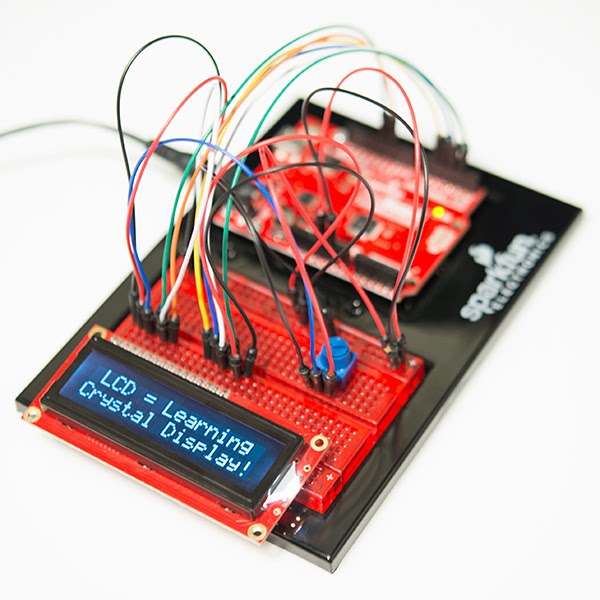
This fall I attended a workshop at Kansas City's Union Station / Science City as part of the SparkFun Education Tour. The day was focused on working through several exercises building circuits with the SparkFun Inventors Kit using an Arduino board. The kit allows you to work through and build 15 different circuits including motors, sensors and an LCD display. No soldering is required and the kit includes a well designed guide with illustrations and descriptions. I enjoyed the workshop and since have built several curcuits with my 10 year old daughter. It is a great way to learn more about Arduino boards. The kit costs around $99.
When I first saw Little Bits - via a Tweet - I instantly thought of our daughters. They are always building things out of legos, cardboard, etc. and I think this will be an excellent way to introduce children to circuits and electronics. You build circuits using components that snap together with magnets. The components have a variety of purposes - switches, lights, sensors, motors, etc. I think Little Bits have huge potential in this educational space and that is why one is sitting under our Christmas tree for our daughters. There are different types of sets available with different numbers of components ranging from $99, $149 and $199. You can check out a TED talk about LittleBits here.
Timber Raspberry Pi Case by Pibow
I recently purchased a Raspberry Pi kit with a grant. In working with a Raspberry Pi it is important to house it in some type of case to protect the components. There are many types of creative cases. I love tech but I also love the feel and looks of antiques. I found this Raspberry Pi kit made of wood from Pibow. This case runs about $20 and I think looks awesome. If you want a more modern case Pibow also makes cases made of neon plastic and other colors.
Friday, November 01, 2013
As Seen On Twitter This Week - October 31, 2013
Each week I send an e-mail out to the teachers in my building with some links that I found on Twitter that week that seemed interesting. These are the links I shared on 10/31/13.
·
Video : What If Finland’s Great Teachers Taught In Your Schools
·
Teachers, Like The Rest of Us, Must Be Salesmen Now
·
Kid Lit Authors Ask The White House to East Standardized Test
Mandates
·
The Five Characteristics of Successful Innovators
·
Survey: For Young Children, Mobile Devices Such as Tablets and
SmartPhones are Now the Mainstay
·
Transforming K-12 Rural Education Through Blended Learning
·
What Schools Can Do To Help Boys Succeed
http://ideas.time.com/2013/10/28/what-schools-can-do-to-help-boys-succeed/
Friday, October 18, 2013
FREE Digital Citizenship Week Webinar with Cable in the Classroom
October is official "Connected Educator Month" and next week there is a focus on how we teach our students to be good digital citizens as we celebrate "Digital Citizenship Week" between October 21-25, 2013.
I will be helping Cable in the Classroom moderate a FREE webinar with Cable in the Classroom's Frank Gallagher entitled "Empowering Students to be InCtrl in a Digital Age". The webinar will take place on Wednesday, October 23rd at 4:00 PM Eastern Time. Click here to register for this free event.
I recently wrote a guest blog post for Cable in the Classroom's blog entitled "Teaching Digital Citizenship Everyday" which you can read here.
Please register for the webinar if you can make it. We would love to have as many perspectives as possible. If you are unable to participate live there will be an archive of the event available at a later date.
Thursday, October 17, 2013
As Seen on Twitter This Week - October 17, 2013
This a copy of the weekly e-mail that I share with my peers. It is a way for me to pass along the great things that I see each week on social media.
As
Seen On Twitter This Week – October 17, 2013
Last
week was a little crazy with conferences so I didn’t send out my weekly
Thursday “As Seen on Twitter This Week” e-mail. I added a few more links
this week to make up for it.
If
you only read a couple I would recommend the first two links – social media
impacting the writing of our students and why girls are not pursuing college
computer degrees.
I
also wrote a couple of blog posts this week that might be of interest:
Does
McDonald’s Have A Better Learning Space Than Your Classroom?
The
Government Shut Down – Graphs to Use For Writing Prompt
Thanks.
Eric
The Dumbest Generation? No,
Twitter is Making Our Kids Smarter
- how is the use of social media
by our students impacting their writing
Why Are Girls Not Pursuing
College Computer Degrees
- I have been reading a lot about this topic as the father of two
girls
Study: U.S. Education Tops
Spending List
- one of the facts that caught my
eye was that between 2000-2011 teacher salaries for U.S. teachers increased 3%,
in other countries increased 17=20%
Making the Most of a Small Space
- ideas on organizing your
classroom to make the most of the space
Howard Gardner “Multiple
Intelligences” are not ‘Learning Styles’
- some great comments from Mr.
Gardner himself on M.I.
How Big Is A House in Different
Countries
- interesting comparison of how
much space we really need from a global perspective
The Unofficial Guide to
Educational Twitter Hashtags
- the use of hashtags is one of
the most important skills to getting the most out of Twitter
Coming Attractions - The Monuments Men - A History Movie and Possible Lesson Plans
Almost three years ago - back in April 2010 - I did a podcast review of Robert M Edsel's book "The Monuments Men" and discussed some ways it could be used in the classroom. It is a great book about the true story of how Allied troops were able to save the artwork stolen by the Nazis in World War II before it was destroyed.
I was so excited this week to happen upon the trailer for the upcoming movie based on the book. It will be out in December 2013 and has enough star power to ensure that it will be a box office hit for the holidays. Check out the trailer below.
Anyone else read this book? What are your thoughts? Please leave a comment on this blog post. Thanks.
Wednesday, October 16, 2013
Does McDonald's Have A Better Learning Space Than Your Classroom?
As I write my dissertation I often seek out places to write which are free of distraction. If I try to write or read at home or in my classroom there are usually things that keep me from working on the task at hand. I don't need much - a place to sit, ample table room to spread out some items, free wifi and a power outlet. Public libraries are great and I like coffee shops - Caribou Coffee is probably my favorite. Sometimes I buy a drink or get a snack.
There is a McDonald's close to my house and over the past couple of months I have frequented it to work several times. Last week as I stopped in after school to work and sat down I noticed just how many people were in the same place using the wifi. Everyone there was using a device on the wifi - cell phones, tablets and laptops. This perhaps isn't surprising but then I also noticed the design of the space itself. It was inviting, pleasant, comfortable. This McDonald's is a great, do I dare say it - a great learning space.
Then two days ago my friend William Chamberlain @wmchamberlain tweeted a picture of a McDonald's with the following text "McDonalds has better learning spaces than most schools :(" and included Ira Socol @irasocol I retweeded it and added "Truth".
Tonight when I finished working on my paper I took some pictures of the McDonald's. They really did a great job of creating a learning space. I won't mind having some of this furniture in my classroom.
Our district has been having lots of discussions about learning spaces and where students learn in our schools. We need to be more efficient and are discussing creating learning environments in space which it underutilized right now - including commons areas and hallways. I have also been thinking about my own classroom. Right now I have 31 classic student desks in my room but would like to eventually move to tables, movable chairs, etc.
Ira Socol added some additional tweets about how teachers can change their learning spaces and included some videos of learning spaces which are better than McDonald's. There are solutions and we need so start having more discussions about making our classrooms open, inviting spaces for our students to learn instead of a factory.
So, what does your learning space look like?
What can we do to make our learning spaces better learning spaced?
Do you have a classroom redesign story to tell?
Please add your comments to this blog post. We would love to hear your thoughts and create some solutions. Thanks.
Tuesday, October 15, 2013
The Government Shut Down - Graphs for Lesson Plan or Writing Prompt
Want some great graphs and visuals for a prompt about the government shut down? Check out the graphs included in this Pew Research Center report (@pewresearch on Twitter). I first saw this in a tweet shared by Will Richardson @willrich45 today.
There are a ton of stats and charts here - great stuff - but how about starting with showing your students these two graphs and see what they infer from the data:
Wow! A lot to think about here. How would you use this in class? Please leave a comment on this post and share. Thanks.
Revolutionary War Spies - A Lesson Plan
Today I want to share an activity I use during our American Revolutionary War unit. The story of how Washington used spies to gather information on the British is often underestimated. Gathering intelligence was of critical importance to both sides in their efforts to win the war.
The science and art of communicating as a spy is a fascinating part of the war and one that students generally enjoy learning about in our Revolutionary War unit.
In the past I have used "George Washington Spymaster: How the Americans Outspied the British and Won the Revolutionary War" by Thomas B. Allen as a selection for my History Geeks book club with students. It is an engaging read with lots of great stories and a code hidden within the book itself. A great book for junior high students wanting to learning about Washington's use of spies.
If you want a more detailed book on spies in the Revolutionary War check out "Invisible Ink: Spycraft of the American Revolution" by John A. Nagy. Great detail and more description about the techniques used by both sides in the war.
Do you do an activity in your classroom on spies in the American Revolutionary War? Please let us know by leaving a comment on this blog post.
Thursday, October 03, 2013
As Seen This Week on Twitter... Sharing Twitter With Staff
I am a big fan of using Twitter to find resources, ask questions of peers and in general just learn about amazing things. I find myself often saying "I saw this great link on Twitter last night...." and have found that peers are generally more willing to tip their toe in the Twitter stream if they see value in creating a PLN.
Several weeks ago I decided that I would look through the tweets which I have favorited in the past week and share some of them with my fellow teachers here at Discovery Middle School. In my first e-mail I told everyone that the items shared in my e-mail would not always be something that I support or agree with 100% but might be something interesting or a great discussion started. I also told everyone to let me know if they liked it or thought it was annoying. I am now three weeks into the experiment I have had several fellow teachers tell me they enjoy the links and so far no one has told me it is annoying.
I have also found that doing this also forces me to go back over my favorites from the past week and there is always something that I had planned on checking out later but forgot.
I will start sharing the texts of the e-mails that I send out each week to share with others beyond Discovery Middle School.
Thanks.
Week 3 of "As seen this week on Twitter... October 3, 2013"
Here is this week’s collection of items that I saw on Twitter which I thought were interesting.
The Horizon Report is a huge study that comes out each year and discusses what trends are predicted in education for the next five years.
The 2013 Horizon Report - What to Expect in Education for the Next Five Years
If you are a fan of the band “Journey” check out the online documentary on the new singer. When Journey needed a new lead singer they found him - on YouTube on the other side of the world. It is an amazing story but will only be available online through October 7th and then it will be shown on the PBS show Independent Lens.
Everyman’s Journey - An amazing 90 minute documentary on Journey’s new singer (available as a video online for free until October 7th)
Other links this week:
31 Activities for “Connected Educator Month”
When Did Americans Lose Their British Accents?
The Role of Mistakes in the Classroom
Subscribe to:
Posts (Atom)